Manually verifying facial recognition results
The goal of this guide is to explore some of the main wmp-face tools on a
single task: recognizing all the faces in a batch of images
In this tutorial, we will see how to:
- move images to correct classification
- compare predictions to validated set
Tutorial setup
To get started with this tutorial, you must first install wmp-face and all of its required dependencies. Please refer to the installation instructions page for more information and for system-specific instructions. The source of this tutorial can be found on Github.
This tutorial requires the completion of the previous tutorial Recognizing faces in large batch.
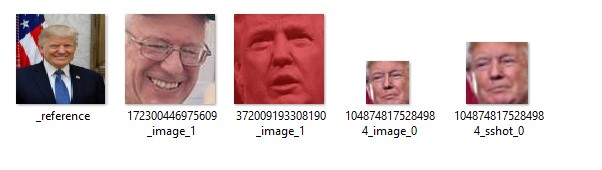
Some of these face thumbnails are misclassified. Our validation task requires us to 1) store the current state of data/outfaces 2) then move the files using _reference.jpg as a guide to know which face thumbnails belong in that folder and 3) store the modified state of data/outfaces and compare the accuracy
Moving images to correct classification
We left off the previous tutorial with the folder data/outfaces containing:
outfaces:.
│   reference_batch.p
│
├───Bernie_Sanders
│       172300446975609_image_1.jpg
│       172300446975609_sshot_1.jpg
│       _reference.jpg
│
├───Donald_Trump
│       1048748175284984_image_0.jpg
│       1048748175284984_sshot_0.jpg
│       372009193308190_image_1.jpg
│       _reference.jpg
│
├───Hillary_Clinton
│       _reference.jpg
│
├───Marsha_Blackburn
│       1048748175284984_image_1.jpg
│       1048748175284984_sshot_1.jpg
│       _reference.jpg
│
├───No_Person
│       1048748175284984_sponsor.jpg
│       270469526847559_image.jpg
│
└───Unknown
        106600513605104_image_0.jpg
        106600513605104_image_1.jpg
        106654180210343_image_0.jpg
        106654180210343_image_1.jpg
        106654180210343_image_2.jpg
        106654180210343_image_3.jpg
        172300446975609_image_0.jpg
        172300446975609_sshot_0.jpg
        372009193308190_image_0.jpg
To store the current state of data/outfaces
>>> from wmp import detect
>>> fr = detect.FaceRecognizer("data/outface")
>>> prev = fr.store_state()
At this point, we move the face thumbnails that are in the incorrect folders, to their appropriate folders. We use the _reference.jpg to know which belong in this folder. Below, we see a misplaced image of Bernie Sanders
Comparing predictions to validated set
Now that we’ve completed our correction, we can find the accuracy:
>>> now = fr.store_state()
>>> fr.classification_report(prev, now)
              precision    recall  f1-score   support

      Bernie_Sanders       1.00      0.67      0.80         3
      Donald_Trump         0.00      0.00      0.00         0
      Hillary_Clinton      0.00      0.00      0.00         0
      Marsha_Blackburn     0.00      0.00      0.00         0
      No_Person            0.00      0.00      0.00         0
      Unknown              0.00      0.00      0.00         0

>>> fr.confusion_matrix(prev, now)
  array([[2, 0, 0],
      [0, 0, 1],
      [0, 0, 1],
      [0, 1, 1],
      [2, 0, 1],
      [1, 0, 2]])